
.svg?fit=max&auto=format&n=4lsCBxooReU0Rm_-&q=85&s=6c4cf5a4687128bb4be7db80d4f90cfd)
How widgets appear in MCP Apps Clients
In MCP Apps clients, the model triggers your tool, and the client then renders both the assistant response and your widget from the tool result.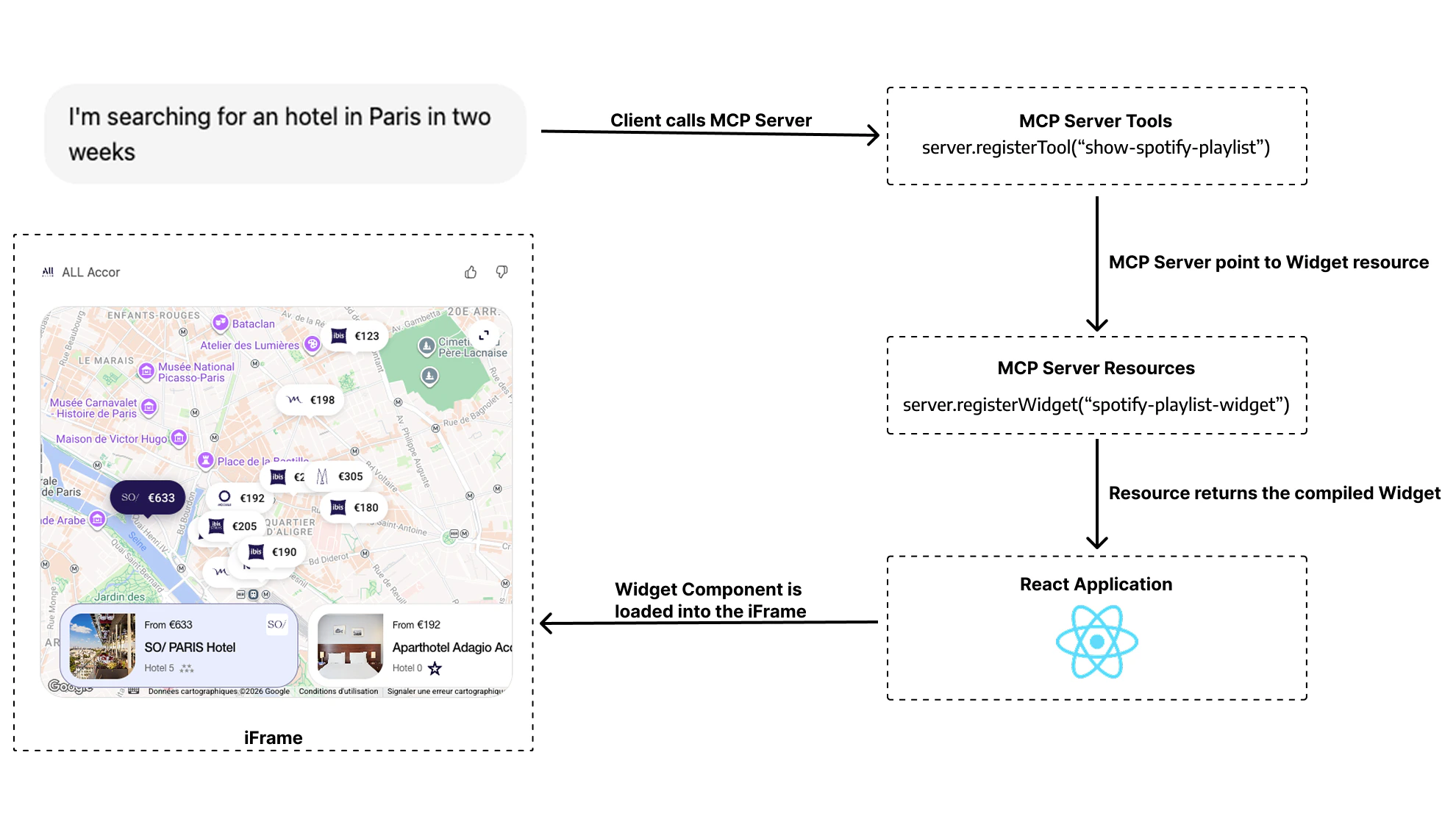
MCP (Model Context Protocol)
MCP is an open standard that allows AI models to connect with external tools, resources, and services. Think of it as an API layer specifically designed for LLMs.What is an MCP Client?
An MCP Client is a frontend application that implements the MCP protocol, and that can consume MCP Servers. Major MCP Clients include:- General-purpose AI apps: ChatGPT, Claude, Goose, etc
- IDEs: Cursor, VSCode, Amp, etc
- Coding agents: Claude Code, Codex CLI, Gemini CLI, etc
- Any other software that implements the MCP protocol
What is an MCP Server?
An MCP server is a backend service that implements the MCP protocol. It exposes capabilities to MCP Clients through:- Tools: Functions the model can call (e.g.,
search_flights,get_weather,book_hotel) - Resources: Data the model can access (e.g., files, database records, UI components)
MCP Apps and ChatGPT Apps: The Same Foundation
MCP Apps is the open UI extension for MCP. It defines the portable contract for interactive widgets in AI clients, including theui/* bridge, tools/call, and _meta.ui.resourceUri.
ChatGPT Apps use that same MCP Apps contract in ChatGPT, and the OpenAI Apps SDK adds window.openai APIs for ChatGPT-specific capabilities.
To avoid repetition, we will now refer to both ChatGPT Apps and MCP Apps as AI Apps.
An AI App consists of two components working together:
- MCP Server: Your backend that handles business logic and exposes tools via the MCP protocol
- UI Widgets: HTML components that render in the AI Client’s interface as interactive UIs
- Text content: What the model sees and responds with
- Widget content: A visual UI that renders for the user
Read our in-depth blog article for a detailed technical breakdown of how AI Apps work under the hood.
Runtime Environments
Both ChatGPT Apps and MCP Apps use the same MCP server architecture and the same portable MCP Apps UI contract. The key practical difference is that ChatGPT additionally exposeswindow.openai extensions.
Think of it this way: your app logic and portable bridge stay the same, and ChatGPT can optionally provide extra capabilities.
Skybridge supports the two main runtime environments for rendering widgets:
Apps SDK (ChatGPT)
ChatGPT host runtime. Implements MCP Apps and adds optional
window.openai APIs for ChatGPT-only features.MCP Apps
Open MCP Apps specification. JSON-RPC postMessage bridge that works across multiple AI clients.
Runtimes Comparison at a Glance
| Feature | Apps SDK (ChatGPT) | MCP Apps |
|---|---|---|
| Protocol | MCP Apps bridge + optional window.openai extensions | Open MCP Apps (ext-apps) spec |
| Client Support | ChatGPT only | Goose, VSCode, Postman, … |
| Documentation | Apps SDK Docs and MCP Apps compatibility in ChatGPT | ext-apps specs |
Next Steps
Apps SDK Deep Dive
ChatGPT-specific APIs,
window.openai, and exclusive featuresMCP Apps Deep Dive
The open specification, JSON-RPC bridge, and client support
Write Once, Run Everywhere
How Skybridge abstracts these differences for you
Quickstart
Start building your first app